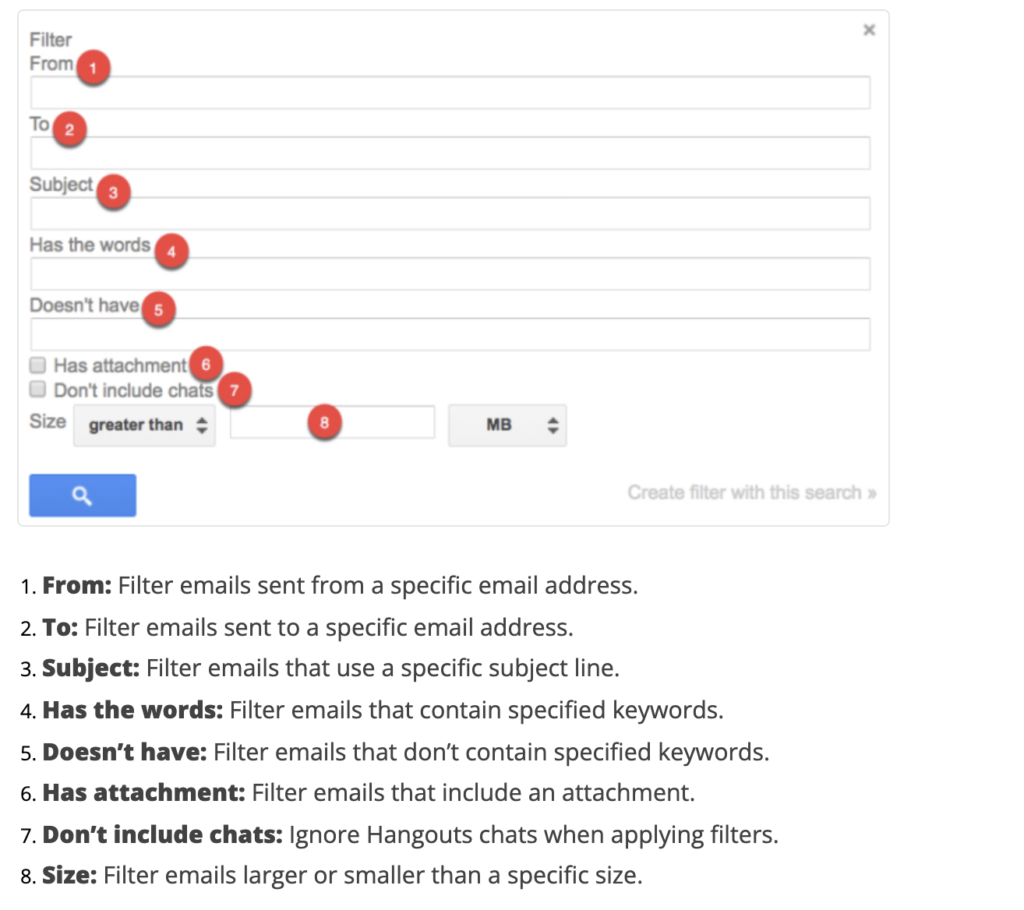
Introduction As digital communication continues to expand, managing email effectively has become crucial. Gmail, one of the most popular email platforms globally, offers a robust filtering system that allows users to organize their inbox efficiently. Understanding how Gmail filtering emails works is essential for users wanting to optimize their email management, improve productivity, and reduce
Introduction
As digital communication continues to expand, managing email effectively has become crucial. Gmail, one of the most popular email platforms globally, offers a robust filtering system that allows users to organize their inbox efficiently. Understanding how Gmail filtering emails works is essential for users wanting to optimize their email management, improve productivity, and reduce clutter.
Gmail Filtering Features
Gmail’s filtering feature enables users to automatically manage incoming emails. Users can create filters based on specific criteria such as sender, subject line, keywords, or even specific phrases within the email body. Once these filters are set, Gmail can automatically categorize emails into predefined labels or mark them as read, star them, or even forward them to another address.
For instance, businesses can filter emails from clients to specific folders, while individuals can sort newsletters and notifications into separate labels, keeping their primary inbox uncluttered. Furthermore, filters can be combined, allowing users to establish complex rules to tailor their inbox management.
Recent Updates in Gmail Filtering
Google periodically refines Gmail’s features, enhancing the filtering options available to users. As of 2023, a noteworthy update includes improved AI-driven suggestions for creating filters based on user behavior. This ensures that Gmail’s filtering capabilities are not only reactive but also proactive, learning from how users interact with their emails.
Additionally, integration with Google Workspace apps allows for seamless collaboration. For example, users can filter emails related to specific projects or teams, making it easier to access relevant communications without digging through the main inbox.
Tips for Effective Email Filtering
To make the most of Gmail’s filtering capabilities, users should consider the following tips:
- Use clear naming conventions for labels: This helps in easily identifying and accessing emails.
- Regularly review and update filters: As email habits change, so should the rules that govern them.
- Combine filters for complexity: Create intricate filtering rules for more effective management.
Conclusion
Gmail filtering emails is not just about reducing inbox clutter; it’s about using technology to enhance productivity and organization. As Google continues to innovate and improve its services, users can expect even more intelligent and adaptable filtering options in the future. Embracing these features can significantly improve how individuals and businesses manage their email communications, ensuring that important messages are never overlooked and enhancing overall communication efficiency.